Building a Weather Data Pipeline with Python on AWS
I'm Vijay Kumar Singh, a Linux, DevOps, Cloud enthusiast learner and contributor in shell scripting, Python, networking, Kubernetes, Terraform, Ansible, Jenkins, and cloud (Azure, GCP, AWS) and basics of IT world. 💻✨ Constantly exploring innovative IT technologies, sharing insights, and learning from the incredible Hashnode community. 🌟 On a mission to build robust solutions and make a positive impact in the tech world. 🚀 Let's connect and grow together!
#PowerToCloud
🌦️ What I Built
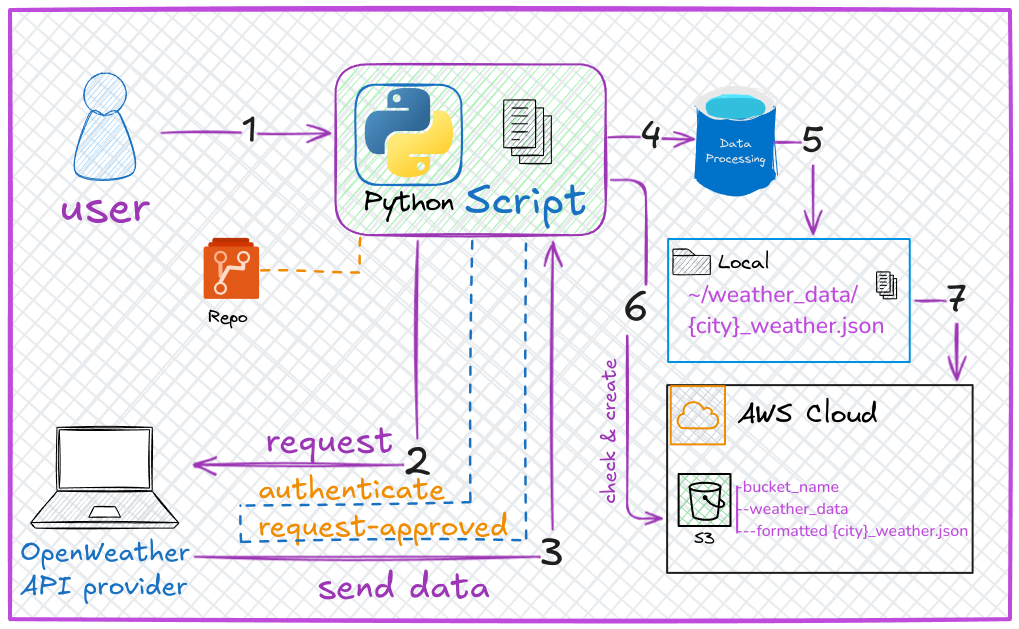
I created a Python script that automates fetching weather data for 5 cities (London, New York, Amsterdam, Delhi, Oslo) from the OpenWeather API, processes it, saves it locally, and uploads it to an AWS S3 bucket (cloud storage). Think of it as a weather data factory:
Fetch raw data from OpenWeather.
Process it to keep only temperature, humidity, and weather conditions.
Save locally as JSON files.
Upload to the cloud (AWS S3) for safekeeping.
Architecture Diagram
🔧 How I Approached It
I broke the problem into small, manageable tasks and tackled them one by one. Here’s my roadmap:
1. Authentication & Setup
Problem: API keys and AWS credentials are sensitive!
Solution: Use
.envfiles to store secrets (never hardcode them!).# Load secrets from .env load_dotenv() api_key = os.getenv("API_KEY") bucket_name = os.getenv("S3_BUCKET_NAME")
2. Fetch Data from OpenWeather
Problem: How to get live weather data?
Solution: Use Python’s
requestslibrary to call the API.def fetch_weather_data(api_key, city): base_url = "https://api.openweathermap.org/data/2.5/weather" params = {"q": city, "appid": api_key} response = requests.get(base_url, params=params) return response.json()
3. Process the Data
Problem: The API returns 50+ fields—I only need 4!
Solution: Extract relevant data using a dictionary.
  def extract_relevant_data(data):
      return {
          "name": data.get("name"),
          "description": data["weather"][0]["description"],
          "temp": data["main"]["temp"],
          "humidity": data["main"]["humidity"]
      }
4. Save Locally
Problem: Organize files by city name.
Solution: Create a
weather_datafolder and save JSON files.def save_to_local(data, city): directory = "weather_data" os.makedirs(directory, exist_ok=True) # Create folder if missing file_path = os.path.join(directory, f"{city}_weather.json") with open(file_path, "w") as file: json.dump(data, file, indent=4)
5. Upload to AWS S3
Problem: Ensure the S3 bucket exists; handle errors.
Solution: Check for the bucket, create it if missing, then upload.
  def bucket_exists(client, bucket_name):
      try:
          client.head_bucket(Bucket=bucket_name)
          return True
      except Exception as e:
          print(f"Error: {e}")
          return False

  def upload_to_s3(client, bucket_name, file_path, s3_key):
      client.upload_file(file_path, bucket_name, s3_key)
🤔 Why I Chose Procedural Programming (Not OOP)
I structured the code as a series of functions (procedural style) instead of using classes (object-oriented programming). Here’s why:
1. Simplicity
The script is linear: Fetch → Process → Save → Upload.
Example:
  def main():
      # Step 1: Connect to AWS
      client = boto3.client('s3')
      # Step 2: Check bucket
      if not bucket_exists(client, bucket_name):
          create_bucket(client, bucket_name)
      # Step 3: Process cities
      for city in cities:
          data = fetch_weather_data(...)
          save_to_local(...)
          upload_to_s3(...)
This reads like a recipe—easy for beginners to follow!
2. Scope
The script does one thing: move data from Point A (API) to Point B (S3).
No need for complex class hierarchies.
3. Faster Prototyping
- Functions let me build and test individual parts quickly.
When Would I Use OOP?
If the project grew (e.g., adding a dashboard, user input, or multiple data sources), I’d switch to OOP. Example:
class WeatherPipeline:
    def __init__(self, api_key, bucket_name):
        self.api_key = api_key
        self.bucket_name = bucket_name

    def fetch_data(self, city):
        # ... logic here ...

    def upload_to_cloud(self, file_path):
        # ... logic here ...
🚧 Key Challenges & Solutions
Error Handling
What if the API is down?
Fix: Used
try/exceptblocks to catch failures.try: response = requests.get(...) response.raise_for_status() # Crash if API call fails except requests.exceptions.RequestException as e: print(f"API Error: {e}")
AWS Permissions
- Fix: Configured IAM roles in AWS to grant S3 access.
Data Clutter
- Fix: Used
extract_relevant_data()to keep only what’s needed.
- Fix: Used
🚀 Next Steps
Schedule the script to run daily (e.g., with AWS Lambda).
Add a dashboard to visualize weather trends.
Expand cities or integrate more APIs (e.g., weather forecasts).
💡 Lessons for Beginners
Start small. Break projects into tiny tasks.
Secure secrets. Never commit API keys to GitHub!
Embrace functions. They keep code organized and reusable.
Happy coding! 🌟 Whether you’re automating weather data or building the next Netflix, remember: every big project starts with a single line of code.
⭐Visit my GitHub repo and star it for future updates. This repo contains multiple projects, and I would be happy if you fork it and implement them yourself.